
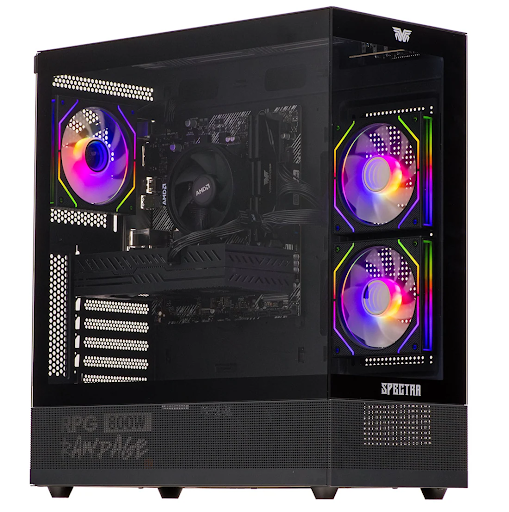
Getting Fortnite to launch is easy. Keeping a steady frame rate through a crowded final circle while editing builds at speed is a different challenge. That is where choosing the right Fortnite gaming PC makes a real difference.
The best PC depends on how you play, the monitor you use and how much performance you want for the future. Whether you are a casual player or a competitive gamer, understanding the essential components can help you make a better buying decision.
In this guide, we will explore Fortnite’s system requirements, important PC components and the factors to consider before investing in a new gaming system.
Start With How You Play, Not the Spec Sheet
Different players have different performance requirements. Understanding your gaming style can help you choose a suitable PC without spending more than necessary.
The Casual or Creative Player
If you enjoy playing with friends or spend most of your time exploring Creative maps, consistent performance should be your priority. A mid-range gaming PC with 1080p support can handle most everyday gaming needs.
You do not necessarily need an expensive graphics card or a high-end processor. Instead, focus on a balanced configuration that delivers smooth gameplay without stretching your budget.
The Competitive Player
Competitive Fortnite players prioritise high frame rates, quick responses and minimal input delay. Many players lower their graphics settings and use Performance Mode to maintain smoother gameplay.
In this situation, a capable processor and a high-refresh-rate monitor are particularly important. Pairing these components correctly can help deliver a more responsive gaming experience.
The Visuals-First Player
Some gamers prefer detailed textures, improved lighting and higher resolutions. If you enjoy Fortnite’s visual features, investing in a stronger graphics card becomes more important.
A suitable display is equally essential. Your monitor and PC should work together to deliver the visual quality and performance you expect.
What Are Fortnite’s Official System Requirements?
Before purchasing a gaming PC, check whether its hardware meets Fortnite’s system requirements. Epic Games publishes minimum and recommended specifications to help players understand what their systems need.
The following table provides a general reference for Fortnite’s published requirements.
| Component | Minimum Requirements | Recommended Requirements |
| Operating System | Windows 10 64-bit (version 22H2) | Windows 10/11 64-bit |
| Processor | Intel Core i3-3225 3.3 GHz | Intel Core i5-7300U 3.5 GHz or equivalent |
| Memory | 8GB RAM | 16GB RAM or higher |
| Graphics | Intel HD 4000 or AMD Radeon Vega 8 | Nvidia GTX 960 or AMD R9 280 equivalent |
| Storage | SSD recommended | NVMe SSD |
These specifications should be treated as a starting point rather than a guarantee of consistently high frame rates. Minimum requirements indicate whether a system can run the game, while recommended specifications provide a more suitable starting point.
For the latest compatibility information, always check the official Fortnite system requirements before purchasing hardware.
The Parts That Matter Most for a Gaming PC for Fortnite
Choosing the right combination of components is essential for a smooth gaming experience. Here are the main hardware specifications to consider.
Graphics Card
The graphics processing unit (GPU) determines how well your PC handles visual effects, textures and higher resolutions. A suitable graphics card can also help maintain better frame rates during demanding gameplay.
If you are comparing different options, explore graphics cards to understand the available choices.
You can also browse RTX gaming PCs from Veno Scorp to compare complete systems with different graphics configurations.
Processor
The central processing unit (CPU) handles important game calculations, player interactions and other background tasks.
Fortnite can become CPU-intensive during busy matches, particularly when multiple players, builds and effects appear on screen. Pairing a capable processor with a suitable graphics card helps avoid unnecessary performance limitations.
Memory and Storage
RAM plays an important role in multitasking and maintaining smooth system performance.
For most modern gaming setups, 16GB of RAM is a sensible starting point. Consider additional memory if you regularly stream gameplay, use voice chat or run several applications alongside Fortnite.
Storage is another important consideration. An SSD can reduce loading times and make the overall system feel more responsive. An NVMe SSD is worth considering if you want faster storage performance and enough space for your growing game library.
Match Your Gaming PC to Your Monitor
Your monitor plays an important role in your gaming experience. Even a powerful PC may not deliver its full visual potential if your display has a limited refresh rate or resolution.
Here are three common display options to consider.
1080p Gaming
1080p is a popular choice among competitive Fortnite players. It requires less graphics processing power than higher resolutions and makes it easier to achieve higher frame rates.
Explore 1080p gaming PCs if you want a system designed around this resolution.
1440p Gaming
1440p offers a balance between visual detail and gaming performance. It provides sharper images than 1080p without demanding as much hardware power as 4K.
You can compare 1440p gaming PCs to find a suitable configuration.
4K Gaming
4K delivers impressive image clarity and detailed visuals. However, running games at this resolution requires more powerful hardware, particularly when higher frame rates are also a priority.
If visual quality is your main concern, explore 4K gaming PCs and compare their specifications before making a decision.
Remember to consider your monitor’s refresh rate alongside its resolution. A high-refresh-rate display can make a noticeable difference when paired with hardware capable of producing enough frames per second.
Buying a Prebuilt Gaming PC or Building Your Own
Building a gaming PC can be rewarding, especially if you enjoy selecting individual components and understanding how different hardware works together. However, it requires research, compatibility checks and time for assembly and testing.
A prebuilt gaming PC offers a more convenient alternative. The components are selected to work together, and the complete system is assembled and tested before delivery.
Veno Scorp offers prebuilt gaming PC options for different gaming requirements and budgets. Buyers can compare processors, graphics cards, memory and storage configurations to find a system that matches their needs.
Before purchasing, check whether the system allows future upgrades. Expandable RAM, additional storage options and graphics card compatibility can help extend the useful life of your gaming PC.
Common Mistakes to Avoid When Choosing a Fortnite Gaming PC
Before making your final decision, keep these common buying mistakes in mind:
- Focusing only on the graphics card: A powerful GPU cannot deliver its full potential when paired with an unsuitable processor.
- Ignoring the monitor: Your display’s refresh rate and resolution affect the experience you get from your PC.
- Choosing insufficient RAM: Limited memory can affect multitasking and overall system performance.
- Overlooking storage capacity: Modern games require considerable storage space, so consider your future requirements.
- Ignoring upgrade options: A system that supports future hardware upgrades can offer better long-term value.
Avoiding these mistakes can help you invest in a balanced gaming setup that meets your current and future requirements.
Choose the Right Gaming PC for Your Fortnite Experience
Finding the right Fortnite gaming PC is about balancing performance, budget and personal gaming preferences. Casual players may be comfortable with a mid-range configuration, while competitive gamers often benefit from stronger processors, higher frame rates and responsive monitors.
Before purchasing, compare the hardware specifications, check the official game requirements and consider how your gaming needs might change over time.
If you are looking for a prebuilt gaming system, Veno Scorp offers a range of gaming PCs with different hardware configurations. Explore the Fortnite gaming PC range to compare available options and find a setup that suits your gaming style and budget.