Introduction
Recorded sales calls are full of useful detail, but listening back to them takes time that busy teams rarely have. A sales manager juggling a pipeline and a team to coach can only hear a few, and the rest go unreviewed.
AI sales call insights help teams get real value from those recordings. They turn each conversation into a short summary, the objections raised, and clear next steps for follow-up. Nobody has to replay a long call just to find the one moment that mattered.
For growing sales teams, that changes how follow-ups, coaching, and customer research get done. Reps walk into the next call knowing what the buyer said last time, and managers spot recurring objections without hearing every call. Before the use cases, it helps to be clear on what these insights actually are.
What Are AI Sales Call Insights?
AI sales call insights are the useful details that artificial intelligence pulls out of sales conversations. The software turns speech into text, analyzes what was said and how, and surfaces objections, buying signals, questions, and next steps.
This is also called AI sales call analysis. The table separates it from related terms that are easy to confuse.
| Term | What it does | How it relates to call insights |
| Call recording | Stores call audio | Supplies raw material, adds no analysis |
| Call tracking | Logs call counts, duration, and missed calls | Shows volume, not what was said |
| Conversation intelligence | Records, transcribes, and analyzes conversations | The wider category that produces call insights |
| Conversational AI | Chatbots and voice agents that talk to customers | Holds conversations, while call insights analyze them |
Why Sales Teams Need More Than Call Recordings
Call recording earns its place in training, quality checks, compliance, and follow-up. But a recording only preserves what was said. It does not tell anyone what mattered.
The limitations of traditional call recording
A recording is passive data. It waits for someone to press play.
Suppose a manager wants to know why prospects stall after the demo. Without analysis, that means opening dozens of files and listening for the same objection to come up. Comparing discovery quality across reps means repeating the job for each one.
A recording alone cannot easily answer questions like these:
- Which objection came up most often this month?
- Which reps ask the strongest discovery questions?
- What did this buyer ask for on the last call?
The result is a large archive with little visibility. Managers end up relying on the few calls they happened to hear and on what reps remember. Closing that gap means reading every call, not just the few someone has time for. That is the job AI does, and the next section shows how.
How AI Turns a Sales Call Into Insights
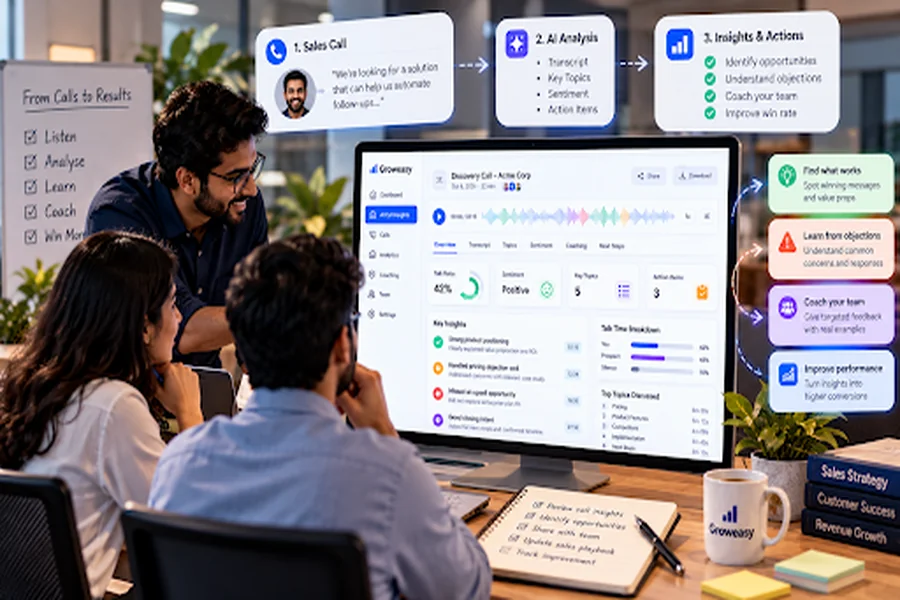
AI turns a sales call into insights in four steps: capture, transcribe, analyze, and deliver. Most tools work after the call ends, and some also offer live prompts.
- Capture. The call is recorded, or its transcript is pulled in from another platform.
- Transcribe. Speech-to-text turns the audio into searchable text, with each speaker labeled.
- Analyze. Natural language processing reads the transcript for topics, objections, sentiment, and buying intent.
- Deliver. Summaries and action items reach the tools the team already uses, such as a CRM.
What an insight looks like
Here is a simplified example of what an AI call summary might contain for one call.
| Field | Example output |
| Customer intent | Wants to move the team to a paid plan this quarter |
| Objection raised | Worried about setup time |
| Sentiment | Positive, cautious about price |
| Next step | Send pricing and book a demo by Friday |
The rep reads this in seconds. Across dozens of calls, the same fields reveal patterns no single conversation could.
What Insights Can You Get From Sales Calls?
AI can pull eight main signals from a sales call: buying intent, objections, questions, competitor mentions, next steps, sentiment, talk-to-listen ratio, and custom keywords. The table shows what each one tells you.
| Signal | What it tells you | Example |
| Buying intent | How ready the prospect is to move forward | Asks about pricing tiers or a start date |
| Objections | What is holding the deal back | Concern about setup time or cost |
| Questions | What the buyer still needs to know | Asks about data security or integrations |
| Competitor mentions | Who else the buyer is considering | Compares your pricing to another vendor |
| Next steps | What was promised, and by when | Send a quote by Friday |
| Sentiment | How the buyer felt at different points | Keen during the demo, hesitant at pricing |
| Talk-to-listen ratio | How much the rep spoke versus the buyer | A rep talking for most of a discovery call |
| Custom keywords | Whether chosen terms came up | “Budget”, “renewal”, or a product name |
No single signal tells the whole story, so read them together. Treat sentiment scores as prompts to check, not verdicts, since tone is hard to judge from text.
How Sales Teams Use AI Call Insights
Teams tend to use call insights in five ways: follow-up, coaching, customer trends, quality assurance, and lead tracking. Each one turns the signals from the previous section into action.
1. Better preparation for follow-up conversations
Reps handle several deals at once, so memory and handwritten notes leave gaps. A short summary puts the last conversation in front of the rep: key points, open questions, and agreed next steps.
2. Supporting consistent sales coaching
Insights tie coaching to real conversations, not abstract advice. A manager can compare how reps handle the same situation. Flagged moments let managers coach on a handful of calls instead of full recordings. The goal is improvement, not surveillance, so reps should know what is measured and how it will be used.
3. Finding customer trends earlier
Sales calls often reveal changing expectations before surveys do, such as budget pressure, a new competitor, or a missing feature. Shared across teams, those themes help marketing adjust messaging, product weigh recurring requests, and sales leaders update enablement material. A weekly digest of top objections, owned by one person, helps these insights travel.
4. Improving quality assurance
Instead of checking calls at random, teams can set review criteria and let AI surface the conversations that deserve attention. Human reviewers still matter when a call needs context or judgment.
5. Keeping follow-ups and missed calls from slipping
Promises made on a call, such as a callback, quote, or demo, are easy to lose. Insights can capture those commitments so they are logged and followed up. Tools with missed call automation can send callbacks or notifications, and an AI receptionist can collect the caller’s requirements, so a lead who got no answer does not vanish.
Which Sales Call Metrics Actually Matter?
The metrics that matter are the ones that change a decision. Start with a small set tied to your sales process and add more only when a real question demands it. Before adding any metric, ask what you will do differently if the number moves. A call analytics dashboard typically covers the activity numbers below.
| Metric | What it tells you | Decision it drives |
|---|---|---|
| Call volume | How much activity is happening | Whether the team has capacity |
| Call duration | How long conversations run | Whether discovery is too short or demos drag |
| Missed call rate | Inbound calls left unanswered | Staffing and call routing |
| Follow-up completion | Whether promised next steps happen | Where deals are slipping |
| Recurring objections | What keeps stalling deals | Which objection to train on |
| Buying signals | Which calls show real intent | Which leads to prioritize |
Volume and duration are activity measures. Recurring objections and follow-up completion are closer to outcomes, so they give managers more to act on.
What to Look For in an AI Sales Call Insights Tool
The right tool is the one your team will use every week. Judge each tool against how your team sells, starting with what makes insights trustworthy:
- Accuracy on your own calls. Ask how the tool handles your accents, background noise, and product terms.
- Language support. Some teams switch languages mid-call, so check which mixed-language calls it handles.
- Fit with how you call. Confirm it covers your regular phone calls, a shared business dialer, or meeting apps.
Then check whether the insights lead anywhere. Ask whether the tool flags what changed in the deal, such as a new objection or competitor mention, and whether output lands where reps already work, ideally the CRM.
Managers have their own needs:
- Search and coaching tools. They should be able to search across calls and comment on key moments.
- Data ownership and security. Find out who owns the recordings and who can access them.
- Pricing and limits. Ask whether pricing is per user, per call hour, or tiered, and what the caps are.
Test before you commit by running the tool on a week of real calls.
How to Start Without Making Reps Feel Watched
Call insights only work if reps trust them, so be open from day one about what is measured and why.
State the purpose plainly: better coaching and less admin work, not grading. Then set a boundary. Microsoft’s guidance for its own conversation intelligence feature says it is not meant for decisions affecting employment, such as compensation or seniority. A similar rule tells reps where the line is.
One approach is a 30-day rollout:
- Week 1: Explain. Say what is recorded, what the AI looks at, and who can see results.
- Week 2: Pilot. Start with volunteers and a manager who will coach, not just review.
- Week 3: Review together. Share summaries with reps first and ask which insights felt intrusive.
- Week 4: Adjust. Trim metrics, change settings that worried reps, then decide whether to widen the rollout.
Two habits keep trust intact: show reps their own insights before managers see them, and use strong calls as coaching examples.
Privacy and Consent When Recording Calls
AI call insights depend on recorded calls, and a recorded voice is personal data, so settle consent before switching anything on. Rules differ by country, and this section covers India.
In India, participants in a call are commonly described as free to record it without asking the other party. Businesses face a higher bar. The Digital Personal Data Protection (DPDP) Rules, 2025 require clear, standalone consent notices that explain the purpose of collection. The main obligations apply in stages, with the substantive provisions arriving in May 2027, and the IT Act and its privacy rules govern until then.
- Tell callers up front that the call is recorded and why.
- Keep the purpose specific, such as “training, quality checks, and follow-up.”
- Limit access to recordings, and share summaries, not raw audio.
- Set a retention period and delete recordings once the purpose is served.
Handled well, consent is not a barrier to AI sales call insights. It is part of using them responsibly.
Conclusion
A recording nobody replays teaches a team nothing. AI sales call insights change that by turning each call into a summary, the signals that matter, and clear next steps. The payoff shows up in better follow-up, more consistent coaching, and an earlier view of what customers are asking for.
To get started, track a few metrics tied to real decisions and tell reps what is measured and why. Handle recording consent from day one, not as an afterthought. The value is not in collecting more calls, but in making the ones you already have easy to act on.
TalkEasy by GrowEasy brings call summaries, insights, and team dashboards into one app. To review your business calls in one place, start your TalkEasy trial.
FAQs
1. What are AI sales call insights?
AI sales call insights are the useful details that artificial intelligence pulls from sales conversations, such as objections, buying signals, questions, and next steps. The software transcribes the call, analyzes it, and delivers a summary, so teams learn what mattered without listening to the full recording.
2. How are AI sales call insights different from call recording?
A recording stores the audio of a conversation, while insights analyze it. Recording tells you a call happened and lets you replay it. Insights tell you what was said, what concerns came up, and what should happen next, so nobody has to listen through every file.
3. What is the difference between conversation intelligence and conversational AI?
Conversation intelligence analyzes recorded conversations to give people insights. Conversational AI, such as a chatbot or voice agent, takes part in conversations with customers. One reviews the talking, and the other does the talking.
4. What insights can you get from a sales call?
Common insights include buying intent, objections, customer questions, competitor mentions, next steps, sentiment, and talk-to-listen ratio. Tools differ in which of these they offer, so check that a tool covers the signals your team needs before you commit.
5. Can AI analyze sales calls in real time, or only after the call?
Both exist. Many tools analyze a call after it ends and produce summaries and action items. Some also offer live prompts during the conversation. Which one your team gets depends on the tool, so confirm this before choosing.